Salesforce
Salesforce connections give you access to your organization’s customer relationship management data.
Source Setup
Etleap authenticates to Salesforce via OAuth. The connection setup page will forward you to Salesforce to authenticate and authorize the Etleap application.
Required User Permissions
Etleap regularly checks a Salesforce connection’s quota usage by calling the resource limits endpoint.
This endpoint requires that both API Enabled and View Setup and Configuration permissions are enabled for the authenticated user.
If these permissions are not enabled for your connection, the validation will fail.
What Data is Available?
You can build pipelines from most standard objects from Salesforce.
Etleap also supports extracting custom objects .
In the file picker, custom objects have __c at the end of their name.
The following objects are not supported by Etleap:
- AcceptedEventRelation
- AccountChangeEvent
- AccountContactRoleChangeEvent
- ActivityHistory
- AggregateResult
- AssetChangeEvent
- AttachedContentDocument
- AuthorizationFormConsentChangeEvent
- CampaignChangeEvent
- CampaignMemberChangeEvent
- CampaignMemberStatusChangeEvent
- CaseChangeEvent
- CaseStatus
- CombinedAttachment
- ContactChangeEvent
- ContactPointTypeConsentChangeEvent
- ContentBody
- ContentDocumentLink
- ContentFolderItem
- ContentFolderMember
- ContractChangeEvent
- ContractStatus
- Custom_Object__ChangeEvent
- DatacloudCompany
- DatacloudContact
- DeclinedEventRelation
- EmailMessageChangeEvent
- EmailStatus
- EmailTemplateChangeEvent
- EventChangeEvent
- EventRelationChangeEvent
- FeedLike
- FeedSignal
- FeedTrackedChange
- FieldSecurityClassification
- FolderedContentDocument
- IdeaComment
- IndividualChangeEvent
- LeadChangeEvent
- ListEmailChangeEvent
- LookedUpFromActivity
- MacroChangeEvent
- MacroInstructionChangeEvent
- Many_Fields__ChangeEvent
- Name
- NoteAndAttachment
- OpenActivity
- OpportunityChangeEvent
- OpportunityContactRoleChangeEvent
- OrderChangeEvent
- OrderItemChangeEvent
- OrderStatus
- OwnedContentDocument
- PartnerRole
- PartyConsentChangeEvent
- Pricebook2ChangeEvent
- ProcessInstanceHistory
- Product2ChangeEvent
- QuickTextChangeEvent
- RecentlyViewed
- RecommendationChangeEvent
- SolutionStatus
- TaskChangeEvent
- TaskPriority
- TaskStatus
- UndecidedEventRelation
- UserChangeEvent
- UserProfile
- UserRecordAccess
- Vote
The exact list of objects available for extraction depends on the configuration of your Salesforce Account.
In order to decide which records to extract, Etleap will use the SystemModStamp if present in the object fields.
This will allow us to detect updated to records, as well as inserts, and the result pipelines will be in update mode.
If SystemModStamp is not present, we will use CreatedDate to extract new records only and updates for existing records will not be extracted.
The resultant pipeline will be in append mode.
If neither SystemModStamp nor CreatedDate are available, the pipeline will be in replace mode.
This will extract all records of an object in each extraction.
Deleted records
Etleap will extract deleted records from Salesforce for objects that have the SystemModStamp field.
This will delete records in the destination, if the pipeline settings allow this (e.g. the pipeline is not set to retain history).
Archived records
By default, Salesforce does not return archived records when querying tables. Etleap will explicitly request archived records for the following Salesforce objects:
- Task
- Event
Unlike deleted records, archived records will not be removed from the destination.
For all objects, except Task and Event, to remove archived records from your destination, please refresh the pipeline.
Blacklisted Fields
Salesforce supports blacklisting fields for all objects. Blacklisted fields are never extracted by Etleap. For more information, please see our Field Blacklisting page.
Change Data Capture (CDC)
Salesforce CDC pipelines in Etleap use event notifications to ingest data in real time.
Etleap supports creating Salesforce CDC pipelines for any object that has had CDC enabled in Salesforce and includes the SystemModstamp field.
Salesforce CDC is only available for pipelines loading data to Iceberg destinations.
CDC Setup
To create a CDC pipeline in Etleap:
- Select an object during pipeline creation that has CDC enabled in Salesforce.
- To enable CDC for an object in Salesforce, follow the instructions here .
- Select an Iceberg destination to load to.
All Salesforce CDC pipelines operate in Update Mode.
CDC Events
The following event types can be captured using CDC:
- CREATE
- UPDATE
- DELETE
- UNDELETE
- GAP_CREATE
- GAP_UPDATE
- GAP_DELETE
- GAP_UNDELETE
If Etleap receives a GAP_OVERFLOW event, a pipeline refresh is required.
The other GAP events are handled with the REST API.
Key Considerations
CDC Limitations
- By default, Salesforce limits the number of CDC enabled objects to 5, not including those added by AppExchange released managed packages .
- Pipelines will pause ingestion once you have exhausted your quota allocation.
- Other Iceberg pipeline limitations apply to Salesforce CDC pipelines.
Quota
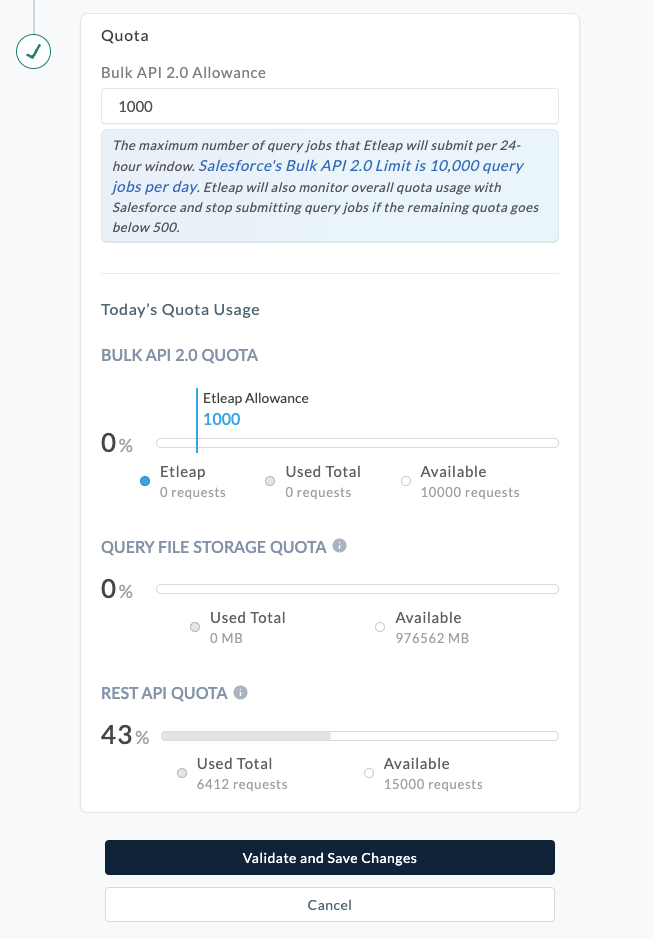
To extract data, Etleap uses the Bulk API V2 . Each Salesforce Account has a limit of 10,000 query jobs per day. By default, Etleap will only create 1,000 query jobs a day. Additionally, Etleap will stop extracting once there are fewer than 500 query jobs available for the account, regardless of how many query jobs Etleap created in the day. Extractions will resume once the quota is replenished, at the end of the day.
You can configure the quota allocated to Etleap in the connection page:
CDC Quota
CDC events are limited by the Event Delivery quota allocated for your Salesforce account.
For details on the allocation limit for your account, refer to the Salesforce CDC allocations page. . Each updated or created record for a CDC pipeline also consumes 1 request from your REST API quota since Etleap must perform an additional lookup for each operation.