Skip to Content

Google Ads

Google Ads connections give you access to your company’s campaign and advertisement data.

Source Setup

We use OAuth to authenticate with Google Ads. When creating a connection, you will be redirected to your Google Ads account to authorize Etleap to extract data. Before setting up a new connection, please perform the following steps to verify that you have the required information.

  1. Log in to your Google Ads account.
  2. Navigate to the top right corner and locate your 10-digit Customer ID.
  3. Copy the Customer ID. When copying it over to Etleap at the connection setup screen, please remove the hyphens.
  4. If you have a manager Customer ID, you’ll be able to extract data from all the other IDs associated with it.
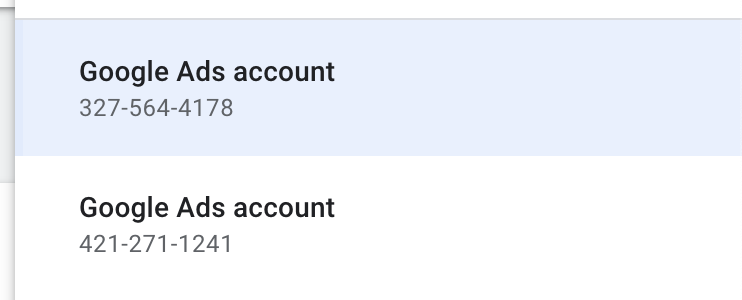
Google Ads Account Numbers
Note

Prefer using an API? Go here  and select Google Ads under the Body header to start creating a connection via API.

What Data is Available?

Note

Update-Mode Deletes Support

Deletes are not applicable for this connector as pipelines handle reporting rather than entity data.

Google Ads connections provide reports and entities to start building pipelines with. Reports contain selectable fields, metrics, segments, and attributed resources. Entities return all the available fields, without metrics and additional segmentation options.

You can create Google Ads pipelines with the following reports:

EntityPipeline ModeIceberg Support
Report: Ad Group  UpdateBatch
Report: Ad Group Ad  UpdateBatch
Report: Ad Group Ad Asset Combination View  UpdateBatch
Report: Ad Group Ad Asset View  UpdateBatch
Report: Ad Group Asset  UpdateBatch
Report: Ad Group Audience View  UpdateBatch
Report: Ad Schedule View  UpdateBatch
Report: Age Range View UpdateBatch
Report: Asset Field Type View  UpdateBatch
Report: Asset Group Product Group View  UpdateBatch
Report: Bidding Strategy  UpdateBatch
Report: Campaign  UpdateBatch
Report: Campaign Asset  UpdateBatch
Report: Campaign Audience View  UpdateBatch
Report: Campaign Budget  UpdateBatch
Report: Campaign Group  UpdateBatch
Report: Click View  UpdateBatch
Report: Conversion Action  UpdateBatch
Report: Customer  UpdateBatch
Report: Customer Asset  UpdateBatch
Report: Detail Placement View  UpdateBatch
Report: Display Keyword View  UpdateBatch
Report: Distance View  UpdateBatch
Report: Dynamic Search Ads Search Term View  UpdateBatch
Report: Expanded Landing Page View  UpdateBatch
Report: Extension Feed Item  UpdateBatch
Report: Feed Item  UpdateBatch
Report: Feed Placeholder View  UpdateBatch
Report: Gender View  UpdateBatch
Report: Geographic View  UpdateBatch
Report: Group Placement View  UpdateBatch
Report: Hotel Group View  UpdateBatch
Report: Hotel Performance View  UpdateBatch
Report: Hotel Reconciliation  UpdateBatch
Report: Income Range View  UpdateBatch
Report: Keyword View  UpdateBatch
Report: Landing Page View  UpdateBatch
Report: Location View  UpdateBatch
Report: Managed Placement View  UpdateBatch
Report: Paid Organic Search Term View  UpdateBatch
Report: Parental Status View  UpdateBatch
Report: Product Group View  UpdateBatch
Report: Search Term View  UpdateBatch
Report: Shopping Performance View  UpdateBatch
Report: Smart Campaign Search Term View  UpdateBatch
Report: Topic View  UpdateBatch
Report: User Location View  UpdateBatch
Report: Video  UpdateBatch
Report: Webpage View  UpdateBatch

You can create Google Ads pipelines with the following entites:

EntityPipeline ModeIceberg Support
ACCESSIBLE BIDDING STRATEGY  ReplaceBatch
ACCOUNT BUDGET  ReplaceBatch
ACCOUNT BUDGET PROPOSAL  ReplaceBatch
ACCOUNT LINK  ReplaceBatch
AD GROUP AD LABEL  ReplaceBatch
AD GROUP BID MODIFIER  ReplaceBatch
AD GROUP CRITERION  ReplaceBatch
AD GROUP CRITERION CUSTOMIZER  ReplaceBatch
AD GROUP CRITERION LABEL  ReplaceBatch
AD GROUP CRITERION SIMULATION  ReplaceBatch
AD GROUP CUSTOMIZER  ReplaceBatch
AD GROUP EXTENSION SETTING  ReplaceBatch
AD GROUP FEED  ReplaceBatch
AD GROUP LABEL  ReplaceBatch
AD GROUP SIMULATION  ReplaceBatch
AD PARAMETER  ReplaceBatch
ASSET  UpdateBatch
ASSET GROUP  ReplaceBatch
ASSET GROUP ASSET  ReplaceBatch
ASSET GROUP LISTING GROUP FILTER  ReplaceBatch
ASSET SET  ReplaceBatch
ASSET SET ASSET  ReplaceBatch
BATCH JOB  ReplaceBatch
BIDDING DATA EXCLUSION  ReplaceBatch
BIDDING SEASONALITY ADJUSTMENT  ReplaceBatch
BIDDING STRATEGY SIMULATION  ReplaceBatch
BILLING SETUP  ReplaceBatch
CALL VIEW  ReplaceBatch
CAMPAIGN ASSET SET  ReplaceBatch
CAMPAIGN BID MODIFIER  ReplaceBatch
CAMPAIGN CONVERSION GOAL  ReplaceBatch
CAMPAIGN CRITERION SIMULATION  ReplaceBatch
CAMPAIGN CUSTOMIZER  ReplaceBatch
CAMPAIGN DRAFT  ReplaceBatch
CAMPAIGN EXPERIMENT  ReplaceBatch
CAMPAIGN EXTENSION SETTING  ReplaceBatch
CAMPAIGN FEED  ReplaceBatch
CAMPAIGN LABEL  ReplaceBatch
CAMPAIGN SHARED SET  ReplaceBatch
CAMPAIGN SIMULATION  ReplaceBatch
CARRIER CONSTANT  ReplaceBatch
COMBINED AUDIENCE  ReplaceBatch
CONVERSION CUSTOM VARIABLE  ReplaceBatch
CONVERSION GOAL CAMPAIGN CONFIG  ReplaceBatch
CONVERSION VALUE RULE  ReplaceBatch
CONVERSION VALUE RULE SET  ReplaceBatch
CURRENCY CONSTANT  ReplaceBatch
CUSTOMER ASSET  ReplaceBatch
CUSTOMER CLIENT  ReplaceBatch
CUSTOMER CLIENT LINK  ReplaceBatch
CUSTOMER CONVERSION GOAL  ReplaceBatch
CUSTOMER CUSTOMIZER  ReplaceBatch
CUSTOMER EXTENSION SETTING  ReplaceBatch
CUSTOMER FEED  ReplaceBatch
CUSTOMER LABEL  ReplaceBatch
CUSTOMER MANAGER LINK  ReplaceBatch
CUSTOMER NEGATIVE CRITERION  ReplaceBatch
CUSTOMER USER ACCESS  ReplaceBatch
CUSTOMER USER ACCESS INVITATION  ReplaceBatch
CUSTOMIZER ATTRIBUTE  ReplaceBatch
CUSTOM AUDIENCE  ReplaceBatch
CUSTOM CONVERSION GOAL  ReplaceBatch
CUSTOM INTEREST  ReplaceBatch
DETAILED DEMOGRAPHIC  ReplaceBatch
DOMAIN CATEGORY  ReplaceBatch
FEED  UpdateBatch
FEED ITEM SET  ReplaceBatch
FEED ITEM SET LINK  ReplaceBatch
FEED MAPPING  ReplaceBatch
GEO TARGET CONSTANT  ReplaceBatch
KEYWORD PLAN  ReplaceBatch
KEYWORD PLAN AD GROUP  ReplaceBatch
KEYWORD PLAN AD GROUP KEYWORD  ReplaceBatch
KEYWORD PLAN CAMPAIGN  ReplaceBatch
KEYWORD PLAN CAMPAIGN KEYWORD  ReplaceBatch
LABEL  ReplaceBatch
LANGUAGE CONSTANT  ReplaceBatch
LIFE EVENT  ReplaceBatch
MEDIA FILE  ReplaceBatch
MOBILE APP CATEGORY CONSTANT  ReplaceBatch
MOBILE DEVICE CONSTANT  ReplaceBatch
OFFLINE USER DATA JOB  ReplaceBatch
OPERATING SYSTEM VERSION CONSTANT  ReplaceBatch
PRODUCT BIDDING CATEGORY CONSTANT  ReplaceBatch
RECOMMENDATION  ReplaceBatch
REMARKETING ACTION  ReplaceBatch
SHARED CRITERION  ReplaceBatch
SHARED SET  UpdateBatch
SMART CAMPAIGN SETTING  ReplaceBatch
TOPIC CONSTANT  ReplaceBatch
USER INTEREST  ReplaceBatch
USER LIST  ReplaceBatch

Key Considerations

  • The Report: Click View resource only returns data from a single day and only stores data from the last 90 days.
  • Google Ads can refresh your data from the last 30 days, which means that in delta-mode we always fetch data from 30 days ago.
  • During the initial catch-up, Etleap starts extracting data from your Google Ads account from the early 2000s. This is to make sure the pipeline extracts all the data available in your account. The initial extractions might be empty, as most Google Ads accounts do not have data populated from that time period. Once the pipeline reaches a time period with data in your Google Ads account, it will successfully start to extract it.