Append Mode
Database and Application Sources
This is for sources where new records are created over time, but existing records never change or get deleted. New rows are extracted from the source, transformed, and appended to the source table.
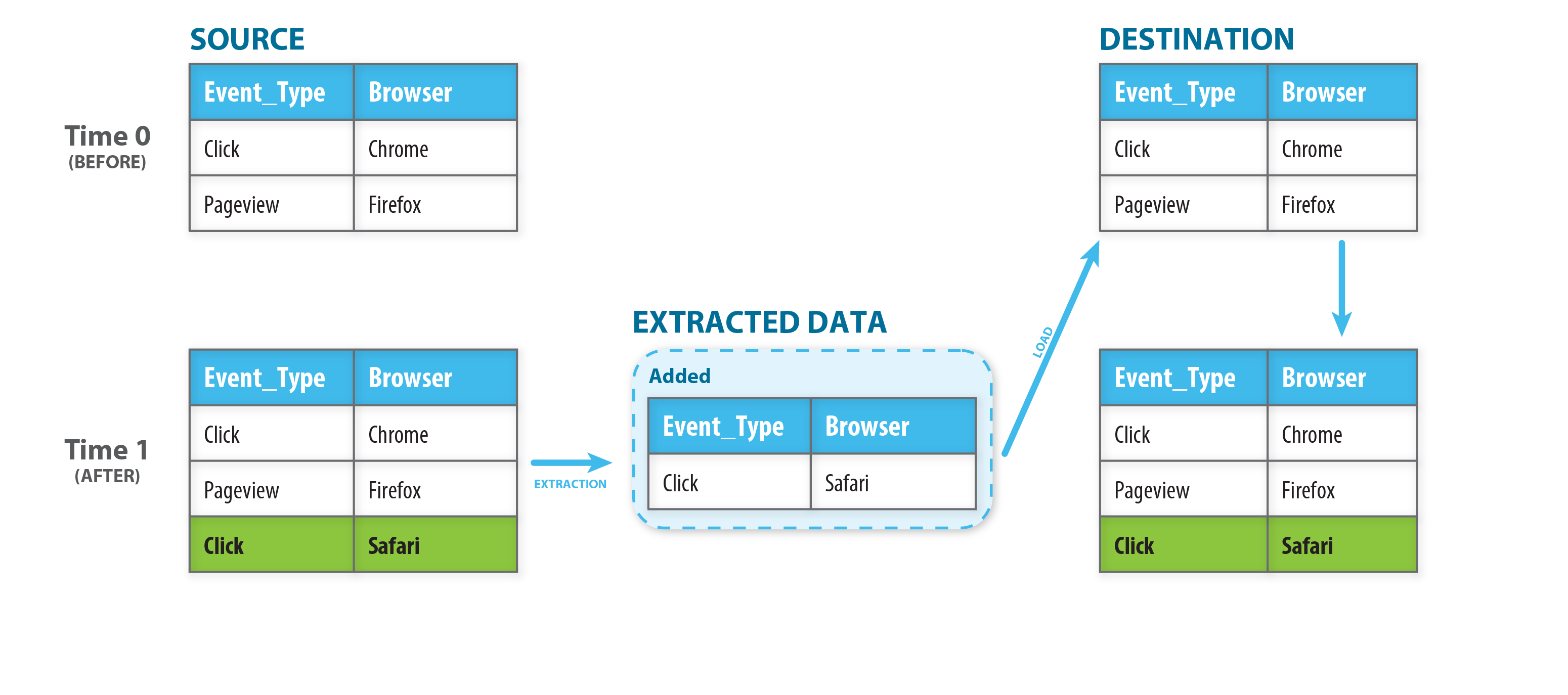
In order for this mode to be applicable, the source must have a method for extracting new records. In the case of a database table where Etleap uses SQL queries to extract data this means the primary key must be monotonically increasing, e.g. an auto-incrementing integer, because the SQL query fetches data whose primary key is greater than the maximum primary key of the previous batch.
Files Change
For append mode pipelines, this option controls how the pipeline handles source files that are modified after they are first processed. This option is available on the final page of the pipeline setup wizard.
The available and default settings vary depending on the source and destination type:
- S3, Azure Blob Storage, SFTP, FTP and Google Cloud Storage sources: you can choose either option. Defaults to “Files sometimes change”.
- Any of those sources loading to an S3 Data Lake destination: always uses “Files sometimes change”.
- File sources loading to an Iceberg destination: always uses “Files sometimes change”, unless they are triggered by events.

Files Do Not Change
If files are never modified, leave the option as “Files do not change”. The pipeline will transform only new files, and load those new records into the destination. Already processed files are not checked for whether they were modified.